How to Register a CAPCOM ID in Monster Hunter Stories 3
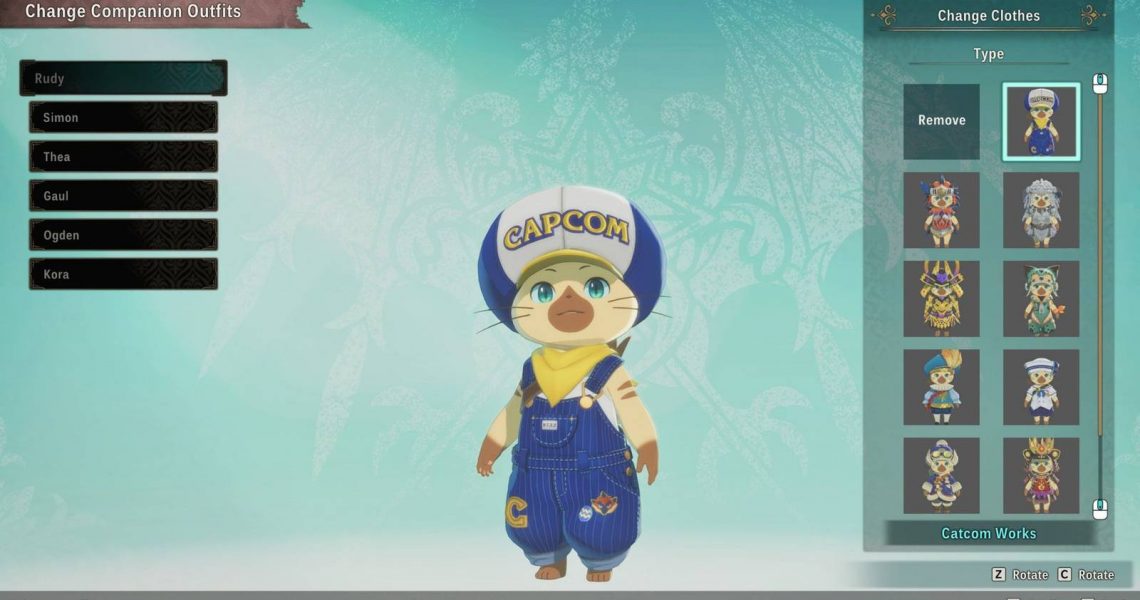
All Monster Hunter Stories 3 companions can have customized appearances through the use of outfits. While most of these are obtained by purchasing the Deluxe Editions of the game, one Rudy outfit is available for free to players who register a CAPCOM ID.
We’ll walk you through the process of registering a CAPCOM ID in Monster Hunter Stories 3 so you can obtain the Catcom Works Rudy outfit for yourself. If you don’t have a CAPCOM ID, we’ll also explain how you can get one.

Monster Hunter Stories 3 Finally Adds One of the Mainline Series’ Most Iconic Features, And It’s Beautiful
Monster Hunter Stories 3 brings back one of the franchise’s most beloved traditions, finally giving the spin-off its own animated cooking scene.
How to Get Rudy’s Catcom Works Outfit in Monster Hunter Stories 3
Unlocking Rudy’s Catcom Works outfit requires players to have and register a CAPCOM ID to the account they’ll be playing Monster Hunter Stories 3 on. To register a CAPCOM ID, players must return to the game’s starting menu.
On the menu, select Options and scroll down the list to Register CAPCOM ID. This will bring up a QR code and a URL. You can scan the QR code with your phone to register through it, or click the link to open the registration page on your current device.
Here, you’ll need to decide between creating a new CAPCOM ID or signing in with one you already own. Completing either of these processes will connect your CAPCOM ID to your Steam Account. After successfully connecting the two, you will need to restart your game.
When the game reopens, stay on the title screen and select the Options menu again. This time, scroll down to Obtain CAPCOM ID Rewards, select it, and press the OK button. Doing this will unlock the Catcom Works outfit and allow you to put it on Rudy through the Chest at your base.
How to Get a CAPCOM ID
While playing Monster Hunter Stories 3, players can register for their own CAPCOM ID on the title screen by selecting Options, then Register CAPCOM ID. Following the links here will ask players if they want to sign in to an existing CAPCOM account or create a new one. Selecting the option to make a new CAPCOM ID will start the process of creation for you.
Players can also register for a CAPCOM ID by visiting the official CAPCOM ID website and selecting Create a CAPCOM ID. Both methods are free, though players have to put personal information into the website to register for their ID.
If you haven’t purchased or downloaded the game yet, registering on the website will give your CAPCOM ID request time to process before you start playing.

- Released
-
March 13, 2026
- ESRB
-
Teen / Fantasy Violence, Mild Suggestive Themes, In-Game Purchases